
Remote Jobs Search - FlexJobs
BoldGoogleAppsBusiness
4.1734.00 Reviews
- Version
- 2.9
- Installs
- 500.00K
- Age Rating
- Everyone
Screenshots
Our Review of Remote Jobs Search - FlexJobs
 Analysis by Appyee
Hey there! So, I recently got my hands on Remote Jobs Search - FlexJobs, and I've got to say, it's quite the nifty app for anyone looking to dive into the world of remote work. Whether you're tired of the daily commute or just want to explore new opportunities from the comfort of your couch, this app might just be your new best friend. Let me take you through my experience with it.
Getting Started with FlexJobs
First things first, downloading the app was a breeze. It's available on both Android and iOS, so whatever device you're rocking, you're covered. Once installed, I was greeted with a clean and intuitive interface. There's nothing worse than an app that's cluttered with too many features, but FlexJobs keeps it simple and focused.
When you open it up, you're prompted to create an account or sign in. I already had an account from the website, so I just logged in. If you're new, don't worry—setting up an account is quick and painless. Plus, they've got a bunch of resources to guide you through the process.
Exploring Job Opportunities
Now, here's where the magic happens. The job search functionality in Remote Jobs Search - FlexJobs is top-notch. You can filter jobs by category, location, and even specific companies if you have some in mind. The app caters to a wide range of industries, so whether you're into tech, writing, marketing, or something else entirely, there's something for everyone.
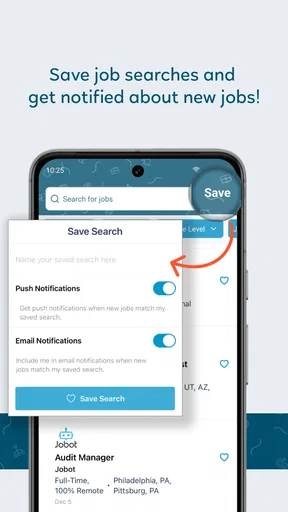
One of the standout features for me was the "New Jobs" section. It keeps you updated with the latest postings so you never miss out on a fresh opportunity. I found myself checking it daily, just in case my dream job popped up.
Choosing Searches That Save Time
I found it more useful to begin with the constraints that genuinely matter than to search broadly and scroll through a long mixed feed. Before opening the listings, decide whether you can work only from a particular region, whether you need a fully remote role, and which job families match your experience. Those choices make the filters more purposeful and help prevent an appealing title from distracting you from a location or schedule mismatch.
When a posting looks promising, I’d read the full description before saving it. A remote label alone does not tell you whether the role is open where you live, whether travel is expected, or what experience the employer expects. I’d treat the listing as a starting point for checking fit, not as a guarantee that every remote-work arrangement will suit every applicant.
User-Friendly Features
Another thing I loved about FlexJobs is how user-friendly it is. The app doesn't just throw job listings at you—it helps you understand them. Each listing is detailed, providing insights into the company, job requirements, and application process. Plus, there are articles and tips on improving your remote work skills right within the app.
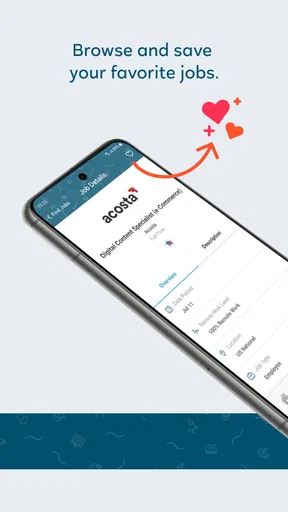
If you're someone who likes to keep things organized, you'll appreciate the "Saved Jobs" feature. You can bookmark interesting listings to revisit later. This was super helpful for me, especially when I was in a hurry and just wanted to save a job to apply for later.
A More Deliberate Application Routine
Saved jobs work best as a short, active queue rather than a growing pile of possibilities. I’d revisit each one with a simple check: is the role still relevant to my target, do I meet the essential requirements, and can I explain why my background fits? If the answer is no, removing it is more helpful than keeping it as a vague someday option.
A practical weekday routine could be to browse new postings briefly, save only the few that merit a closer read, and then return later to tailor an application to one of them. That keeps job discovery separate from application writing. It also reduces the temptation to send the same generic résumé everywhere, which is rarely the best use of time when a listing has specific requirements.
The app suits people who want a focused place to explore flexible and remote roles across different kinds of work. It may be especially useful if you are changing industries and want to scan several job categories before settling on a direction. On the other hand, if you already know the exact employer and role you want, going directly to that employer’s careers page may be faster than browsing a broader job-search service.
When a Search Feels Stuck
If the results seem thin, I would first loosen one filter at a time rather than abandoning the search altogether. A narrow job title, a specific location, and a strict work arrangement can combine to leave very few relevant matches. Widening the title to include related roles, or checking whether a suitable position is listed under a neighboring category, can reveal options without making the search unfocused.
If a listing disappears or a saved opportunity no longer feels current, I would return to the search and check for a similar role instead of assuming the app has lost the entire search. Job openings change, and a saved item is best treated as a reminder to review a posting, not as a promise that it will remain available indefinitely. Keeping a separate note of the role and employer can also help you pick up your search later without relying on memory.
Subscription and Pricing
Okay, so here's the thing: FlexJobs isn't free. I know, I know—paying for a job search app might seem odd at first. But hear me out. The subscription is totally worth it if you're serious about finding legitimate remote work. FlexJobs vets all job listings, ensuring you won't run into scams or sketchy offers.
The pricing is reasonable, and they offer various plans to fit your needs. Plus, they occasionally have deals and discounts, so keep an eye out for those.
What to Check Before Paying
Because job searching can stretch over weeks, I’d think about how actively I’m going to use the service before paying for access. A concentrated search period, with time set aside to review openings and prepare applications, makes more sense than subscribing while only checking occasionally. The app is free to install, but in-app purchases range from about $24 to $72 per item, so I’d review the purchase details shown on the device before committing.
It is also worth separating the value of a curated job search from the promise of a job outcome. Screening can make a search feel more focused, but it cannot decide whether a particular employer will respond or whether a role matches your circumstances. I would still read each posting carefully and use my own judgment before sharing personal information or applying.
Compared with broad job boards, this app is aimed more squarely at people who want flexible and remote opportunities rather than every kind of vacancy. That focus is useful if those are your priorities, but a general job board or an employer’s own careers site may provide a better route when you are seeking local in-person work or a specific opening. I see the trade-off as focus versus breadth: FlexJobs narrows the hunt, while other channels may cast a wider net.
Setup Checks and Everyday Troubleshooting
If getting started does not go smoothly, I’d check the basics before assuming there is a larger problem. Make sure the app is installed on a compatible device; the current version is 2.4 and it requires Android 7.0 or later. Then confirm that you are using the account details you intended to use, especially if you have already signed up through the website. Trying to create a second account while an existing one is available can make it harder to keep your saved jobs and activity together.
For a search that does not look right, I’d revisit the selected category, location, and wording before changing anything else. A small adjustment can clarify whether the issue is simply an overly narrow search. If the app itself seems unresponsive, closing and reopening it, checking the internet connection, and confirming that the installed version is current are sensible first steps. These checks do not guarantee a fix, but they help distinguish a basic device or connection hiccup from a search that needs different criteria.
In a realistic after-work routine, I might open the app on my commute home, scan new roles that fit my field, and save one or two for a careful review later. At home, I could compare the requirements with my résumé and decide whether the application is worth the effort. That two-stage approach makes the app useful even when I do not have time to apply immediately, while keeping a quick browse from turning into an impulsive application.
When Another Route Makes More Sense
I would not make this my only channel if I needed work urgently or had a very specific employer in mind. Searching company career pages directly can be more efficient in that situation, and using more than one job-search route can help avoid overlooking roles that fit. FlexJobs is a business-focused app from BoldGoogleApps, but the best result still depends on choosing a search strategy that matches your goals and following each employer’s application process.
It is also not a shortcut for deciding what kind of work you want. If you are unsure whether you want contract, part-time, or full-time work, pause to define your priorities before browsing. Otherwise, a large range of listings can make the search feel busy without making it more productive. I’d use the app to investigate realistic options, then narrow them with questions about schedule, skills, location, and the kind of working arrangement I can actually accept.
Final Thoughts
All in all, Remote Jobs Search - FlexJobs is a fantastic tool for anyone diving into the remote work scene. It's easy to use, packed with handy features, and most importantly, it's reliable. I found it to be a great companion in my job hunting journey, and I think you will too.
So, if you're looking to swap your office desk for a home setup, give FlexJobs a whirl. It might just lead you to your next big career move!
Its audience rating is around 3.9 from roughly 1,500 ratings, and it has passed 100,000 installs. That gives a newcomer some context about its reach, though I would weigh the app against my own needs rather than treat popularity as proof that a particular search will work out. It is free to install, and its content rating is Everyone.
My practical recommendation is to try it when your main goal is finding remote or flexible work and you are willing to search methodically. Use filters to establish fit, save only worthwhile roles, and reserve time to read requirements before applying. If you mainly want nearby office work, need a direct route to one employer, or prefer to use only free job-search channels, another option may suit you better. For a focused remote-work search, though, I think it is a sensible place to begin.
Verdict
Strengths of Remote Jobs Search - FlexJobs
- Extensive job listings in various industries.
- User-friendly interface enhances navigation.
- High-quality job postings with verified employers.
- Customizable job alerts for personalized updates.
- Mobile app syncs seamlessly with desktop platform.
Limitations of Remote Jobs Search - FlexJobs
- Requires a subscription for full access.
- Limited free features compared to competitors.
- Some users report occasional app crashes.
- Job search filters could be more detailed.
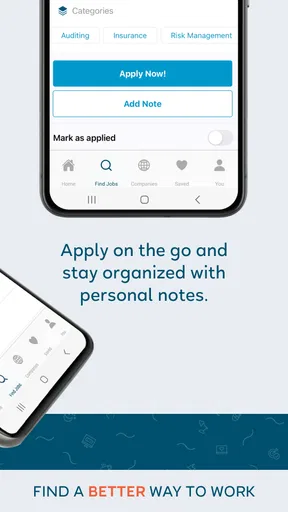
- No direct application through the app.
Other Releases by BoldGoogleApps
View All
MyPerfectResume Builder
Business4.0
Similar Picks in This Category
View All
LinkedIn: Community & Network
LinkedIn3.8

Zoom Workplace
zoom.com4.1

Microsoft Teams
Microsoft Corporation4.6

Meta Business Suite
Meta Platforms, Inc.4.6

Webex Meetings
Cisco Systems, Inc.4.5

TeamViewer Remote Control
TeamViewer4.4
Frequently Asked Questions
What is Remote Jobs Search - FlexJobs?
Remote Jobs Search - FlexJobs is a mobile application designed to help users find legitimate and flexible remote job opportunities. It caters to those seeking work-from-home positions, freelance gigs, and part-time roles across various industries. The app ensures that all listings are vetted for authenticity, providing a reliable platform for job seekers.
How does FlexJobs ensure job listing authenticity?
FlexJobs employs a dedicated team that screens each job listing to ensure legitimacy and quality. They verify the authenticity of companies and the details of the job postings, filtering out scams and low-quality opportunities. This rigorous vetting process provides users with peace of mind and a trusted job search experience.
Is there a subscription fee for using the app?
Yes, FlexJobs operates on a subscription-based model. Users must pay a fee to access the full range of job listings and additional resources the platform offers. This subscription helps maintain the quality of the listings and supports the team’s efforts in vetting each opportunity. Various subscription plans are available to fit different needs.
What industries are covered by FlexJobs?
FlexJobs covers a wide array of industries, including technology, healthcare, education, marketing, and more. The app offers remote positions in diverse fields, catering to various skill sets and professional backgrounds. This diversity makes it suitable for anyone looking for remote work, whether they are entry-level candidates or seasoned professionals.
Can I apply for jobs directly through the app?
Yes, FlexJobs allows users to apply for jobs directly through the app. The platform provides an easy-to-use interface where you can submit applications and track your job search progress. Additionally, users can save job listings for later and receive notifications about new opportunities that match their preferences.
